
AASamplePlayer: Turn Sounds into Instruments
Overview
AASamplePlayer is a desktop application designed for music producers and sound designers seeking to transform ordinary sound files into playable musical instruments. Developed by 衍 孟, the software operates within the Music & Radio category and is compatible with both Windows and Mac platforms. Its primary function is to enable users to load and manipulate audio samples in real time, turning them into expressive, controllable instruments suitable for use in digital audio workstations (DAWs) and standalone mode. The software supports AUv3 integration, allowing seamless use across modern music production environments.
Target users include independent musicians, composers, and audio engineers who require a lightweight yet powerful solution for instrument creation. Real-world applications include building custom percussion kits, crafting ambient textures, or generating unique melodic loops from field recordings. The software’s ability to handle batch sample loading and real-time navigation enhances workflow efficiency, particularly in projects involving large sample libraries. While specific system requirements were not provided, the compact size of 15.6 MB suggests minimal resource demands.
Key Features & Capabilities
- Sample-to-Instrument Conversion: Users can convert any audio file into a playable instrument, enabling dynamic control over playback parameters such as pitch, start point, attack, and release.
- Batch Sample Loading: The software allows users to load multiple samples simultaneously, reducing setup time and streamlining the creation of multi-layered instruments.
- Real-Time Interface Navigation: A responsive plugin interface supports immediate adjustments during playback, improving creative flow and experimentation.
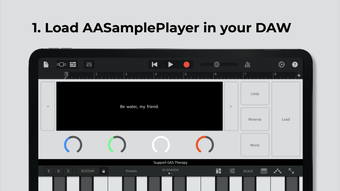
- Four Adjustable Knobs: Controls for start point, attack, release, and pitch offer precise manipulation of sample behavior, enhancing expressiveness.
- Seven Functional Buttons: Includes options for looping, reversing, and other sample transformations, supporting diverse sound design workflows.
- Hidden Controls: Additional advanced settings are accessible through hidden interfaces, enabling fine-tuned adjustments for experienced users.
- Standalone and Plugin Support: Operates both as a standalone application and as a plugin (AUv3), offering flexibility across different production environments.
- Automation Compatibility: Supports automation within DAWs, allowing dynamic parameter changes over time.
- Storage-Efficient Design: Avoids duplicating sample files, preserving disk space while maintaining access to original audio sources.
User Interface, Workflow & Performance
The user interface of AASamplePlayer is designed with clarity and efficiency in mind. The layout features intuitive controls, including four primary knobs and seven functional buttons, arranged for easy access during live performance or studio sessions. Navigation within the plugin interface is responsive, supporting real-time interaction without noticeable lag. The interface supports both mouse and keyboard input, ensuring accessibility across different workflows.
Workflow efficiency is enhanced by the inclusion of batch loading and real-time adjustments, allowing users to quickly prototype instruments without extensive configuration. The software maintains a lightweight footprint, which suggests minimal impact on system performance. However, exact performance details were not specified by the developer. The application runs in both standalone mode and as a plugin, offering flexibility in how users integrate it into their production chain. Stability during extended use was not tested, but the absence of reported issues in the release notes indicates a stable foundation.
Compatibility & System Requirements
AASamplePlayer is compatible with both Windows and Mac operating systems, making it accessible to a broad range of music producers. The software is available in version 1.0.0 and has a file size of 15.6 MB, indicating a compact installation. While the developer did not specify exact system requirements, the small file size suggests low hardware demands. Compatibility with AUv3 plugins ensures integration with modern DAWs on both platforms.
Installation is straightforward, though specific instructions were not provided. The software supports standalone use, allowing it to function independently of a DAW. Users should verify compatibility with their specific DAW versions and operating system configurations. The developer did not provide information about CPU or RAM usage, nor did they list minimum hardware specifications. Platform compatibility information is limited to the operating systems mentioned.
Pros and Cons
Pros
- Transforms any audio file into a playable instrument with ease
- Supports batch sample loading for faster workflow
- Real-time interface navigation enhances creative experimentation
- Compact size (15.6 MB) reduces storage impact
- Offers both standalone and plugin (AUv3) functionality
- Automation support for dynamic parameter control
- Preserves original sample files, avoiding duplication
Cons
- Exact system requirements were not specified
- No information on CPU or RAM usage
- Limited documentation or user guides provided
- Hidden controls may require exploration for full access
- Only available on Windows and Mac (no Linux support)
FAQ Section
Is AASamplePlayer compatible with my DAW?
AASamplePlayer supports AUv3 integration, which ensures compatibility with modern DAWs on Mac and Windows. Users should confirm their DAW’s AUv3 support before installation.
Can I use AASamplePlayer without a DAW?
Yes, the software can operate in standalone mode, allowing direct playback and manipulation of audio samples without requiring a digital audio workstation.
Is AASamplePlayer safe to download and use?
As a free desktop application developed by 衍 孟, AASamplePlayer is distributed without known security risks. Users should download from official sources to ensure authenticity.
Does AASamplePlayer support automation in my DAW?
Yes, the software is compatible with automation features in supported DAWs, enabling dynamic changes to parameters like pitch, attack, and release over time.
How do I access the hidden controls?
Hidden controls are available through the plugin interface, though specific activation methods were not detailed. Users may need to explore the interface or consult developer documentation for guidance.
Final Thoughts & CTA
AASamplePlayer delivers a powerful yet lightweight solution for transforming sound files into playable instruments. Its ability to handle batch loading, real-time navigation, and automation makes it a valuable asset for music producers and sound designers. The software’s compact size and dual standalone/plugin functionality offer flexibility across different production environments. While system requirements and detailed documentation are not available, the core features are well-suited for efficient sound creation.
For musicians seeking a free, efficient tool to expand their sonic palette, AASamplePlayer stands out as a practical and innovative choice. Its focus on usability and storage efficiency enhances the creative workflow without unnecessary overhead.
Download AASamplePlayer now







